Tuesday, March 31, 2009

Changing the Width of Your Blog Page

I find that the blogspot template at 660px wide is too narrow for some of my needs. Yet the "stretch" version is too wide especially making reading the text difficult. So I customized it!

Here are a few easy steps if you want to change yours too! Don't worry, as long as you know which template you have been using, you can always go back to that template (under Layout > Pick a New Template tab) and everything will go back to the way it was!

Step 1
You need to be in your Layout > Edit html tab:


Step 2
Scroll down until you see the Header html code, it's currently at 660px:


Step 3
Change it to 800px:


Step 4
Scroll down to Outer Wrapper code:


Step 5
Change that to 800px as well:


Step 6
Change Main Wrapper to 550px (this is the column width of you main post entry):


Step 7

Finally, don't forget to click "Save Template"


If you have modified your font and colors, you will have to do that again. Sorry!

------------------------------------------------------

The following is for my fellow Fire Divas! Go to the Posting > Create (or Edit Posts if you have already posted) > Edit Html tab


Copy and paste the html code and you will have our Etsy Mini up in gallery mode!

Monday, March 23, 2009

Arrow Springs Explore the Magic of Silver Glass Workshop

Perhaps some of you would like to join us for a weekend of fun!?!

Explore the Magic of Silver Glass with Hayley


In this two-day workshop, you will explore the many facets of working with silver glass. For reducing silver glass you will learn how to work with different reduction flames, varying length of reducing time, and changing placements and positions of the bead in the flame, to achieve various results. For striking silver glass you will learn how to achieve and recognize the "first strike," thus enabling you to duplicate the striking sequence on your own.

Once the basic technique of working with silver glass is achieved, you will learn the different ways of using silver glass to expand your repertoire. Some of the techniques we will cover include encasing silver glass, surface decoration with silver glass – stringers, shards and twisties, and using silver glass in gravity swirls. In addition to how to achieve the best results with this mysterious glass, special emphasis will be placed on design and perfect bead shaping. With the exception of the initial instruction on how to strike and reduce spacer beads, you will be making large bicone/tubular shaped beads.

Students should be at an intermediate skill level and comfortable working on a propane/oxygen mix torch.

See Hayley's website.

Two day class. Class hours are 9 to 5, lunch included.
Cost is $425 and includes all materials.

Dates:
December 5 & 6, 2009

Tuesday, March 10, 2009

Photoshop Workshop!!!

Some of you know that graphic design is my day job and I have been using Photoshop since shortly after its inception in the late 1980's (now I am showing my age!). About a month ago, I gave a short private lesson to a friend and decided that I should really be teaching a Photoshop Workshop custom tailored for beadmakers and jewelry artists! I love to teach (watch for my upcoming silver glass workshop at Arrow Springs in December!) so here I am, offering a two-day workshop for Photoshop, including some photography.

Student may attend one or two days, but only those who sign up for both days will have priority. If you sign up for only one day, you will be put on a wait list to obtain a spot should the class doesn't fill up with two-day students. Having said that, if enough of you are interested in only a one-day class, I will be happy to arrange for another workshop.

This will be a hands-on class with two students sharing a computer, eight maximum.

Photoshop Workshop – The Details

Requirements
Prior experience with computer programs is highly recommended - essentially you should know more than just getting on the web and reading your email. This is a fast-pace workshop and I'd hate to have you not being able to keep up! It's also important that you have or plan on purchasing Photoshop or Photoshop Elements. If you have a laptop and prefer to use your own program, feel free to bring it. You will be working on a Macintosh computer - if you are on a PC, the only difference is your Alt is our Command key. Photoshop is almost identical on both platforms.

Cost
$125 for Day One
$200 for both days

Dates
Saturday 25 April and Saturday 2 May, 9am to 5pm with an hour for lunch
The reason for picking two Saturdays is that you will have time between the two classes to practice at home and attend the second day with questions. I also feel that you will digest the information better this way.

Agenda
Day One Morning
• You are to bring a photograph of your bead/jewelry, your camera, as well as the bead/jewelry itself, preferably the same one.
• I will demonstrate the steps on how to process an image on Photoshop - sharpening, color correcting so the image matches the piece, cropping and sizing for various usages including web, saving, archiving, retouching, etc.
• You will do these steps with your computer partner on the image you brought

Day One Afternoon
• I will work with each of you and photograph the same bead/jewelry with YOUR camera on my photo setup, we will discuss about photography setup as well
• You will process the new image in Photoshop
• You will go home with a CD of your images

Day Two Morning
This is a working day for questions and I will help each of you to trouble shoot any issues you might have at home after Day One. You may bring other beads/jewelry to photograph and work through the process again.
Day Two Afternoon
For those of you who are ready to go on to some of the more advance functions, I will demo more techniques in the afternoon.

Examples
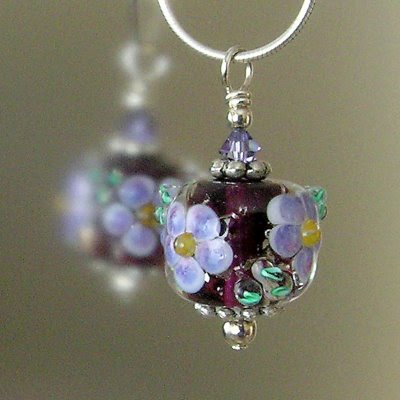
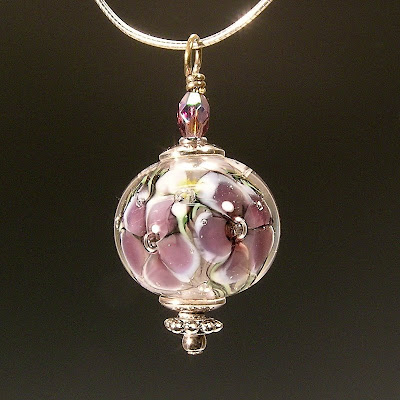
Attached are two images - first one was the image my friend took on her own before our lesson, the second one was what she ended up with after she photographed with her own point-and-shoot camera and processed the image in Photoshop. (Note: she didn't bring the pendant from the first image.)

BEFORE
AFTER
Metal Clay

We are lucky to have been taking a series of workshop with Hadar Jacobson! For those of you who are not familiar with her work, she is truly an amazing artist. Her website, artinsilver, is like an online museum! In addition, she has developed a line of metal clay - bronze and copper - that has superb workability. The best part is that you do NOT have to keep the clay cold! It comes in powder form thus has an unlimited shelf life. Mixing is easy peasy. You can find information, including a video on how to mix the powder, at her online store, as well as her blog.

We have been busy playing with rocks! Here is a pile (with a pillow and lentil beads) - they all still need to be fired except for one.

Friday, March 6, 2009

Peacock


One of the many reasons I love using silver glass in almost all of my work is because of its unpredictability! The surprise element is what draws me to keep torturing myself time and time with results that don't often meet expectations. Then once in a blue moon (when all the stars are aligned perfectly, I suppose!), something magical happens. This is truly one of those times. When I took this bead out of the kiln, I was speechless (for those who know me well can attest that it's no simple feat - to make me speechless, that is! lol!)!!!

I am still debating if I should list this on one of our stores or keep it for my private collection!

Wednesday, March 4, 2009

SE3 Printed Booklet Available at lulu.com!

We realize that some of you do not own a good-quality inkjet color printer so we ordered a sample booklet from lulu.com to check its quality. We find it meets our high standards, thus enabling us to offer you this in hard copy printed booklet form!

For $43.90 plus shipping, you don't have to purchase the high-res CD and take it to your neighborhood service bureau yourself!

http://www.lulu.com/content/paperback_book/se3/6206163

If you are interested in SE2 in printed booklet form, please contact us:

http://envisionsf.com/contact.html